
Client Area
There are a few different variations that you will see in regards to the client’s access interface of the Client Area. Essentially the same information is available through them all, just in different layouts, and areas. We are going to review a typical layout to get you familiar with what the client can control in this administration and billing management tool.
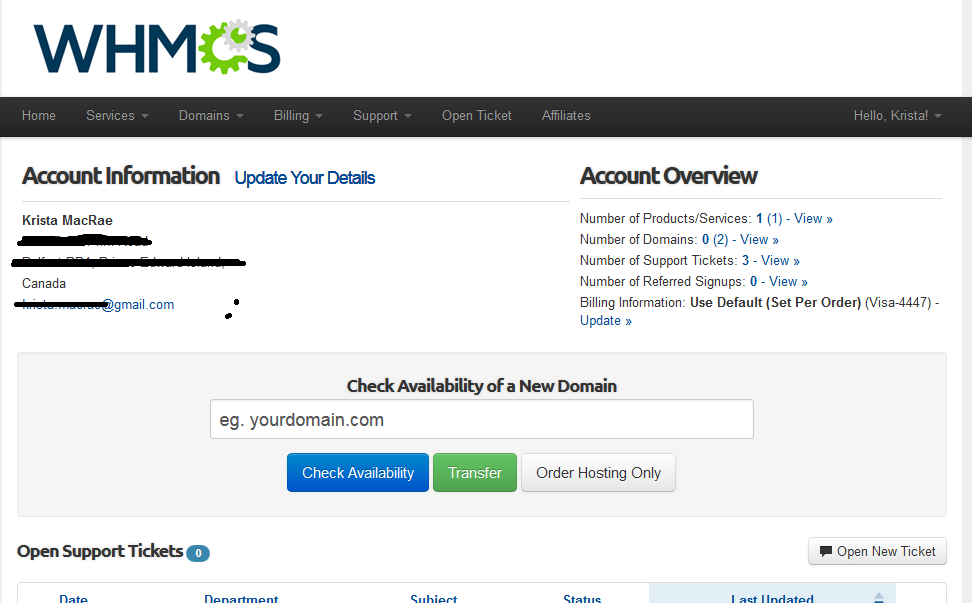
You will notice when you first login to the client area you have a logout option running along the top portion of the page, and also an area which reflects who’s account you are current accessing.
Running along the right hand pane of the page, you will find a number of quick navigation links for client management reasons. Those include:
- Portal Home (Home Page) – In here you can access the account details, Submit and review support tickets, view and signup for affiliate programs, submit pre-sales inquiries, see the server’s current status. Announcements by the web hosting provider are also viewable in this section as well as knowledgebase articles and downloads. This area will allow the client to place new orders, as well as use a feature for checking available domains.
- Client Area – This gives the client a quick overview of the support tickets for the account and any unpaid invoicing.
- Announcements – Is where the client can view any announcement put out to the clients regarding any information regarding their services, such as server upgrades, and migrations.
- Knowledgebase – This is a library of support articles for the client to use in troubleshooting his own support issues.
- Submit Ticket – this is just what it says, in this area the client can open support tickets to support or billing for assistance with any issues or inquiries they may have.
- Downloads – This is another library of sorts where the client can download all manuals programs and other files the provider might offer.
- Order – In this area the client can order new services or add-ons offered by the web hosting provider to add to this current account contact.
Below this is a rundown of the client’s account information. Company name, mailing address and contact email address. Lower again, you may have a feature to add funds to your account as well as quick statistics about your account. (eg: Products/Services, Domains, Tickets, Referrals, and Billing Information).
We will now review the several tabs running along the top portion of the page where the client has a number of options for managing their account. Lets review those area separately:
Home
In this area the client has a quick overview of there open support tickets, and any invoices not yet paid, quick links and a statistics overview, as we have reviewed above.
My Details
In this section the client has the ability to adjust their contact details such as mailing address, phone number, email address. Add sub-contacts to the account for granting accesses for other people allowed to manage the account. Change their credit card details, payment method, change the language of the client area, as well as change the password for accessing the client area itself.
My Services
The area gives you a rundown of all the products and services you have, or have had active at one time. It will also usually include for each the price, billing cycle, and due date of those. Next to each product you should have a “icon” or “view details” or something to click on to manage that product. By clicking these areas you will be brought to a page showing that products details. This will give a full overview of the product and what it offers. You will usually also have the ability to explore add-ons for this product, see and possibly change the products Cpanel login, as well as cancel the product or service itself.
My Domains
This area works just like the My Details area as it lists all the domains active or expired that were associated with this account at one time, showing registration dates, expiry dates and pricing info. As like the products this section also provides a clickable link to manage that domain. When clicking into those areas where you will get a full overview and have renewal options, add-on options.
Billing
This could be in separated tabs in some cases but will include billing information and quotes, past and present. This also like the other areas lays out the dates, amounts and payment status of each. Again you can view each invoice and sometimes also be provided the option to pay those within the invoice view if unpaid, or see details of the payment if already processed.
Support
In this area clients can open new support ticket requests to the support team of that hosting provider (This is us). The clients can also view older ticket that are closed and currently open, or take action on open or ongoing tickets, like respond, place in a different priority level, or close themselves.
Some other areas that the client areas might include is an email area where all correspondence that was sent to the account email contact is viewable here as well. Another could be Affiliate program details should the web hosting provider provide this.