
WordPress Issues: Changing Admin Passwords
Changing Admin Passwords
If the client does not remember their admin WordPress password, and does not have access to the admin email address that WordPress was set up with, it is possible to reset via phpMyAdmin.
You can access phpMyAdmin by logging into cPanel, and clicking on the phpMyAdmin icon.
Before checking phpMyAdmin, you should check the wp-config.php file (via File Manager) and ensure that you know which database you need to update the password for.
The wp-config.php file will look something like this. You will see the DB name as bowseran_nanas is the example below.

Next, you will go into phpMyAdmin
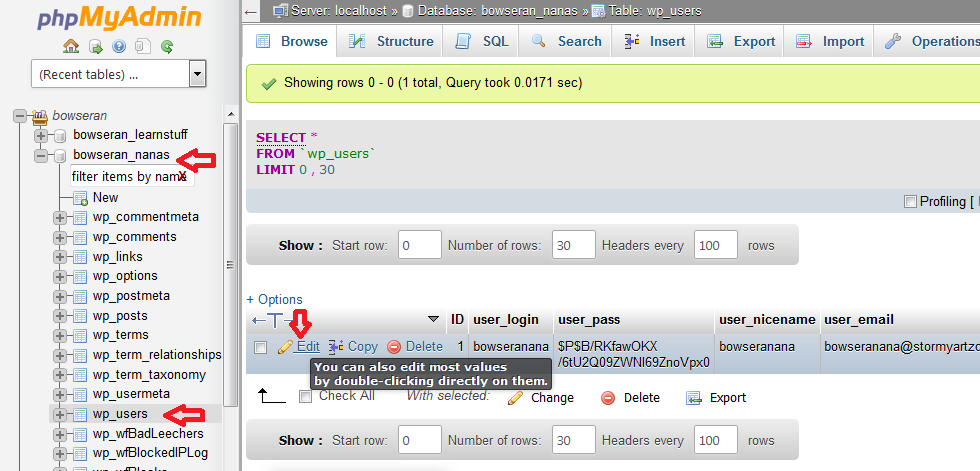
Find the appropiate datebase (as seen below) and then the “wp-users” table.
Next click Edit to the right of the username that you need to reset
Next, enter a new password and set the function to MD5 to encrypt the password
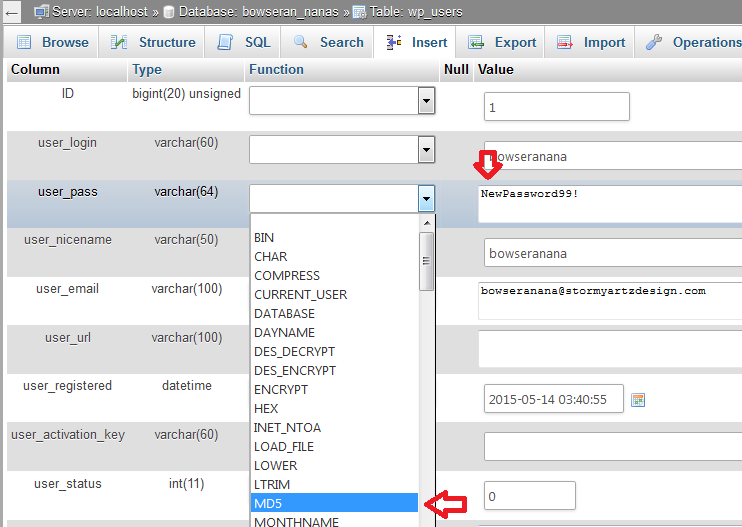
This will change the password for the user, and they should be then able to log in. This should be requested via a ticket through the Client Area to confirm security on the account.